Start with your own words.
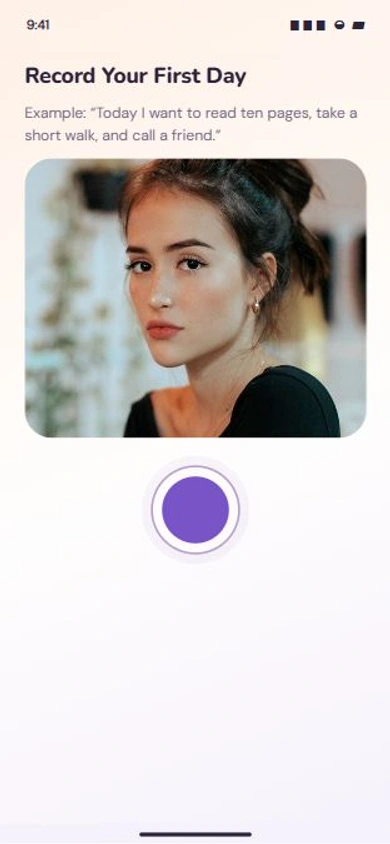
Record a short video about what matters today: a walk, a chapter, a moment to yourself.
 VideoHabitsJoin the waitlist ↗
YOUR WORDS. YOUR GOALS. ONE DAY AT A TIME.
VideoHabits turns a short video diary into daily goals you can actually come back to. For iPhone journalers building habits one day at a time.
No streak guilt. No perfect morning required. Gentle reminders you can snooze or pause.
Want to try it now? Join the free iPhone beta on TestFlight. Install Apple’s TestFlight app first.
Join the waitlist above if you would rather hear when the App Store version is ready.
Open beta on TestFlight · Website updated .
For individual iPhone users. It is not a team task manager; an Android app is not offered.
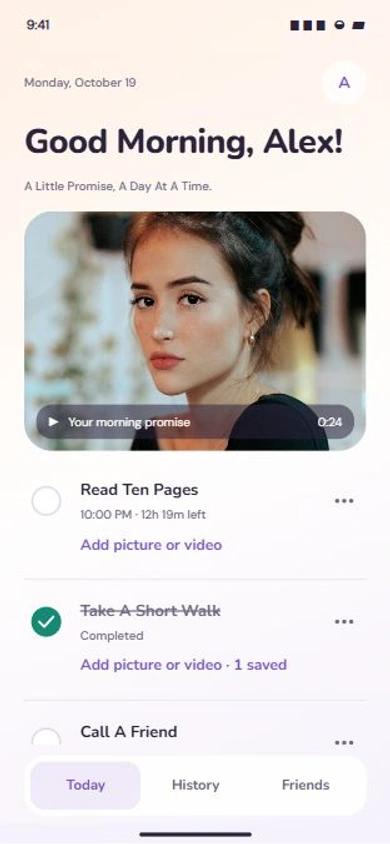 EXAMPLE COMPLETED DAY3 of 3 goals complete.Pages read. A walk taken. A friend called.Walk photo saved · Come back to your own words ↗
App interface previews and an illustrative completed day · Fictional example content
Record what matters.
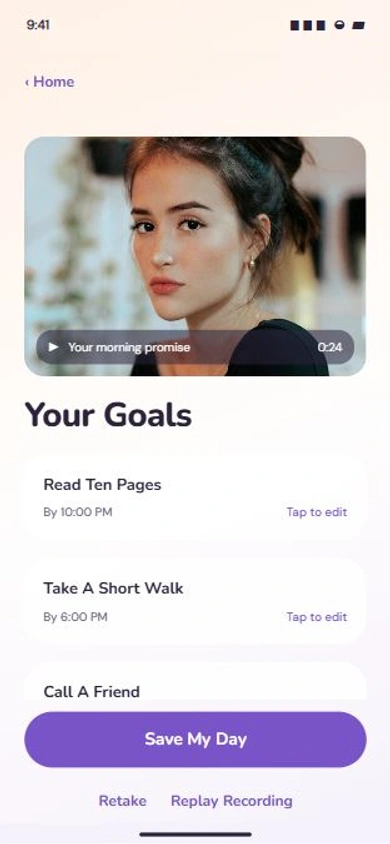
Review your goals.
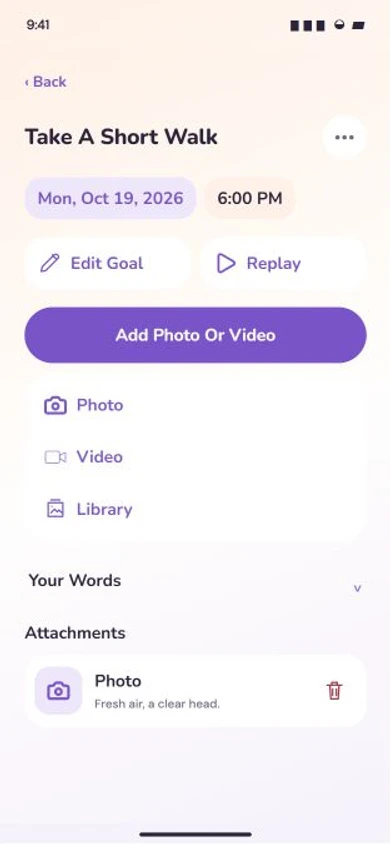
Come back to your own words.
NO STREAK GUILT. YOUR WORDS. YOUR PACE.
Start where you are, with one thing you want to do today. Choose gentle reminders that fit your day, and snooze or pause when you need room.
Record a short video about what matters today: a walk, a chapter, a moment to yourself.
Review suggested goals from your recording, then edit the details and choose what to keep.
Check off your goals and add an optional photo or video to remember the effort you made.
WHY I BUILT VIDEOHABITS
I started recording myself to hold myself accountable. Saying my goals out loud gave me something to come back to during the day. Those personal check-ins eventually became VideoHabits.
Ethan Tran · Founder and publisher
Ask me about VideoHabits ↗A LOOK AT YOUR DAILY RITUAL
Your morning words, three small wins, and a photo from your walk. Return to your saved days to rewatch your recordings and see how your year unfolded.
ILLUSTRATIVE COMPLETED DAY · EXAMPLE CONTENT
“A few pages, a short walk, and a call to a friend.”
3 of 3 goals complete
Your words and the effort you made stay together in your saved day.
WHAT’S INSIDE
Set your reminder frequency, active hours, and tone to fit your real day. You can snooze or pause reminders whenever you need room to start again.
Preview a Friends post before sharing and choose whether to include your video or evidence. Selected goals and progress are visible to accepted friends, including friends you accept later.
Return to your saved-day history and recording streak to see when you showed up. Your next small step still matters after a missed day.
See saved goals and progress, then tap to open the app. Widgets depend on your installed native beta build and iOS; iOS controls refresh timing.
BEFORE YOU TRY IT
Cloud content is private by default. Your recording library stays private unless you choose to share content in a Friends post. Preview each post and choose whether to include the full video or evidence. Current and future accepted friends can see Friends-audience posts. You can unshare a post.
No. Cloud content is not end-to-end encrypted. VideoHabits uses access controls and secure connections to protect your cloud content. Services providing storage or selected processing need access to perform those functions. Read the Privacy Policy for the details.
AI processing requires a separate permission choice. When you enable AI processing, OpenAI receives recording audio for transcription. An audio-bearing recording file may be sent where required. Transcript text and relevant timing context are used to suggest goals you review before saving. You can turn off new AI processing in Settings → Privacy. This does not recall data already sent or guarantee zero provider retention.
Yes. Choose manual goals to enter your own goals without AI processing. Manual goals do not make a signed-in cloud recording on-device-only. AI, Live Goals, camera, microphone, and notification permissions are separate choices.
Beta is free. App Store pricing will be published here before launch. New members complete their first recording and goal review before choosing a subscription. A monthly or yearly Apple subscription is required to enter the App Store app. Apple shows the localized price and any eligible introductory trial before purchase. TestFlight in-app purchases are free during beta testing and do not carry over to the App Store version.
Manage or cancel your app subscription through the settings in your Apple account. Deleting the app or your VideoHabits account does not cancel that subscription. Canceling renewal preserves verified access until expiry. Manage Apple subscriptions. To leave the email waitlist, contact Ethan.
YOUR NEXT SMALL STEP
Join the waitlist for availability and launch updates. Want to try it now? Join the iPhone beta on TestFlight.